
Quick Summary
- Product: TwinClips AI
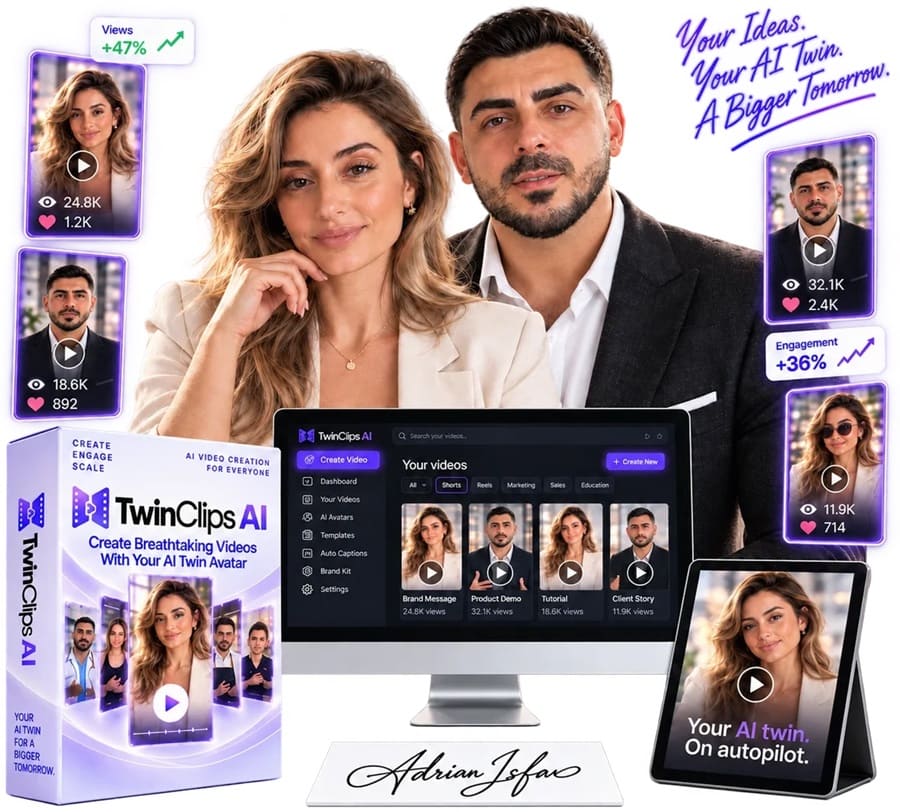
- Creator: Adrian I. (founder), with brand ambassador Roxana I.
- Launch Date: Thursday, October 22, 2026 at 11:00 AM ET
- Front-End Price: $67 one-time (regular $159) 👉 Amazing Discounted Price Right Here! 📌
- Category: AI twin video app: turns one photo and a 30-second voice sample into captioned short-form videos of you
- Refund Policy: 60-day money-back guarantee
Short-form video works for almost every business, from coaches and realtors to dentists and online sellers. The hard part is showing up on camera every day: getting ready, setting up lights, recording take after take, then editing and adding captions before you can post.
TwinClips AI takes the filming out of that routine. You create a lifelike AI twin of yourself once, and from then on you type what you want to say and your twin presents it in your own voice. I used it to run a 30-video Shorts and Reels series, and in this review I’ll cover how it works, who’s behind it, the features, the price, the upgrades and the results I got.
What Is TwinClips AI? How Does It Work Step By Step?
TwinClips AI is a browser-based AI content studio that builds a personal AI twin from one clear photo and clones your voice from about 30 seconds of speech. You give your twin a script, or let the built-in AI write one, and it delivers a finished, captioned vertical video in around 60 seconds, ready for TikTok, Instagram Reels and YouTube Shorts. It includes studio, cinematic and AI-scene styles, 30+ studio backgrounds, ready-made templates, link-to-video, a built-in editor, 50+ languages, 500 video credits and a commercial licence.
Here’s the three-step setup I followed to get my twin ready:
➤ Step 1 — Upload your photo. Start with one clear, front-facing photo of yourself in good lighting (JPG or PNG), or pick one of the ready AI avatars. TwinClips turns it into a reusable, lifelike presenter.

➤ Step 2 — Record your voice. Speak naturally for 30 seconds, right in your browser, or choose one of the lifelike voices. Your twin learns your voice, so every video sounds like you.

➤ Step 3 — Type what you want to say. Give your twin a tip, an answer to a customer question or your next offer, click generate, then preview and refine the 9:16 video before you share it.

After that one-time setup, every new video is just a new script, not a new filming session.
About The Creator

TwinClips AI is the vision of Adrian I. (Adrian Isfan), its founder and a seven-figure software vendor. He works alongside Roxana I., the brand ambassador and the face of TwinClips, and JV manager Harpreet K. Adrian’s team is behind a long line of successful launches, including CallFluent AI, Creativio AI, LeadsGorilla AI, ClawBrand AI, AdGenius AI and Mapify360.
That track record shows in how complete TwinClips feels on day one: a clean three-step setup, real example videos across a dozen niches, free training and updates, and premium support. With a 60-day guarantee behind it, Adrian clearly stands behind what he builds, which gives me real confidence in this launch.
TwinClips AI Review – Key Features
✅ Personal AI Twin From One Photo: Upload one clear photo and TwinClips creates a reusable, lifelike digital version of you for every future video. There’s no camera, no lighting and no backdrop to set up, so you can publish on days you’d never want to film.
✅ Voice Cloning In 30 Seconds: Record a short, natural voice sample once in your browser, and your twin delivers every future script in your own tone and cadence. You can also pick from lifelike stock voices when you want a different narrator.
✅ Script To Video In About A Minute: Type or paste a script and TwinClips turns it into an on-camera delivery from your twin, usually ready in around 60 seconds. Videos can be 5, 10, 15, 30 or 60 seconds long, which covers every short-form format.
✅ AI Hooks, Scripts And Ideas: When you’re short on ideas, the built-in AI writes hooks and full scripts for you. Link-to-Video turns existing content, such as a blog post or product page, into a fresh video script.
✅ Studio, Cinematic And AI-Scene Styles: Choose the look that matches each message, from a clean studio setup to a cinematic feel or AI-generated scenes. With 30+ studio backgrounds, AI storyboards and B-roll, your videos stay varied without a single location change.
✅ Automatic Captions: Clear, readable captions are added automatically, so your message lands even when people scroll with the sound off, which is how most short-form video is watched.
✅ 50+ Languages: Your twin can deliver the same message in more than 50 supported languages with the same face and voice, so you can reach customers abroad without re-recording anything.

✅ Ready-Made Templates And Built-In Editor: Start from hundreds of formats for educational, promotional, product showcase, before-and-after and holiday videos, then fine-tune each one in the built-in editor. It removes the blank-page feeling completely.
✅ HD Vertical Videos For Every Platform: Export crisp, HD 9:16 videos with optimized file sizes that upload smoothly to TikTok, Instagram Reels and YouTube Shorts, so one video works across all your channels.

✅ 500 Credits And Commercial Use: The front end includes 500 credits that don’t expire while your account is active, enough for up to 90 videos of 15 seconds. The commercial licence lets you use your videos for your business and your clients.
DEMO VIDEO
🎁Exclusive Vendor Bonuses
TwinClips AI comes with these extras included in the Founder’s License:
- Free Training: step-by-step guidance to create your twin and your first videos with confidence.
- Free Updates: new improvements added to the app at no extra cost.
- Premium Support: help from the TwinClips team whenever you need it.
- Ready-Made Video Templates: hundreds of formats to start creating faster.
- 30+ Studio Backgrounds: change the scene without changing your setup.
TwinClips AI Pricing & Funnel Summary
TwinClips AI Front End ($67)
The Founder’s License is $67 as a one-time payment, down from the regular $159, and checkout runs through JVZoo. You get the full studio, 500 credits and the commercial licence, with extra credits and avatar styles saved for Pro. Two optional order bumps appear at checkout, and a 60-day money-back guarantee covers the purchase.
Is it worth it? Paid AI avatar tools commonly run around $29 to $39 a month, which adds up to several hundred dollars a year, and hiring a creator or agency often costs $500 or more per video. One payment for a twin that looks and sounds like you is excellent value for coaches, local businesses, marketers and creators who want to post consistently. One thing worth knowing: the 500 credits cover around 90 short videos, which carried my whole series comfortably, and if you plan to publish every day for months, TwinClips AI Pro adds 1,200+ extra credits.
💡 Value-for-Money Rating: 9.4/10
A HeyGen plan at $29 a month costs $348 in a year, and one agency-made video often runs $500; TwinClips costs $67 once. Those 500 credits cover around 90 captioned short videos in your own face and voice, which is three months of daily posting for a coach or local business without a single filming session. My 30-video series used about 340 credits and brought in more than thirty times the price, so for anyone who sells through short-form video, this pays for itself with the first few clips.
👉 Get TwinClips AI At An Exclusively Discounted Price 📌
The Upsells:
➡️ Order Bump 1 — Avatar Packs ($37): Avatar Packs adds extra ready-made AI avatars to your account, which is handy when you want a second presenter, a fresh face for a client project or a different look for a new content series alongside your own twin.
➡️ Order Bump 2 — Premium Caption Styles ($27): Premium Caption Styles gives your videos more caption looks, so each series can have its own style and your clips stand out in busy feeds. A nice touch for brands that care about a consistent visual identity.
➡️ OTO 1 — TwinClips AI Pro ($127): Pro unlocks unlimited AI avatars, 1,200+ extra credits, outfits and avatar styles, Hollywood-style effects, priority rendering and VIP support. It’s ideal for agencies, daily posters and anyone creating videos for several clients or channels.
➡️ Downsell — TwinClips AI Pro ($77): Buyers who pass on Pro are offered the same Pro upgrade at a lower one-time price, a friendly second chance to add the extra credits and styles.
Why Should You Choose TwinClips AI?
My Personal Experience With TwinClips AI
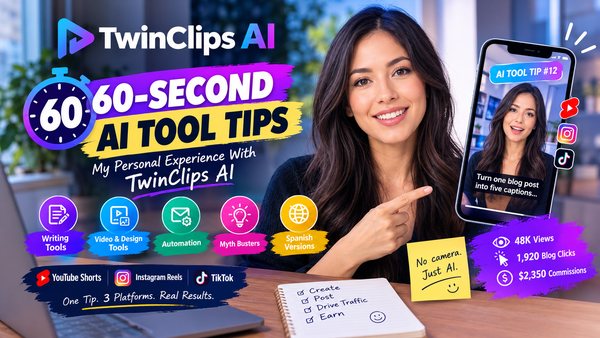
I had early access before launch, so I ran a 30-video series called “60-Second AI Tool Tips”, posting one short tip a day about AI tools I use, on YouTube Shorts, Instagram Reels and TikTok, each one pointing to a review on my blog.
I uploaded one front-facing photo taken by my window, recorded my 30-second voice sample, and my twin was ready a few minutes later. Here’s how “60-Second AI Tool Tips” was planned:
- Week 1 — Writing Tools: seven 30-second studio-style tips on AI writing, such as “Turn one blog post into five captions” and “The prompt I use for product descriptions,” each with a hook written by the AI hook tool.
- Week 2 — Video And Design Tools: seven tips such as “Make a thumbnail in two minutes” and “Why captions double your watch time,” filmed in front of a different studio background each day.
- Week 3 — Automation: seven 45-second tips on email follow-ups, post scheduling and simple AI agents for small businesses, built with Link-to-Video from three of my own blog posts.
- Week 4 — Myth Busters: seven 20-second “AI myth versus fact” clips in the cinematic style, with the myth in the first five seconds and the fact as the payoff.
- Bonus — Spanish Versions: my two best-performing tips re-delivered in Spanish with the same face and cloned voice, posted to reach Spanish-speaking followers.
A typical script ran about 30 seconds: “Most people use AI to write posts. Here’s a better trick: paste your best-selling product page and ask for five hooks. Pick one, and you’ve got your next video. Full tool list on my blog.”
I batched each week’s seven videos in a single sitting of about 40 minutes, using the AI hook writer for openings and the studio style for most clips. On two early videos I adjusted a word that my twin pronounced a little too fast, which took a few seconds in the script, and after that the delivery felt natural. The automatic captions saved me the most time; I didn’t touch an editor once. The whole series used roughly 340 of my 500 credits.
Over the month, the series reached around 48,000 views across the three platforms, sent 1,520 clicks to my blog and brought in approximately $1,350 in affiliate commissions. For a month where I never set up a camera, that’s a result I’m very happy with, and I’ve already started the next 30 videos.
Who Should Use TwinClips AI?
- Coaches and consultants: turn everyday client questions into daily authority videos that warm up leads before a discovery call.
- Real estate agents: post property intros, neighborhood guides and market updates the same day a listing goes live.
- Salons, med spas and dental clinics: explain treatments and answer common worries in short captioned clips that build trust before the first visit.
- Fitness coaches: share workout tips and myth-busting videos between sessions, keeping your feed active all week.
- E-commerce stores and restaurants: present new products, weekly specials and founder stories with a familiar face your customers recognize.
- Agencies and freelancers: offer twin videos to clients as a new service, with the commercial licence covering client work.
- Marketers and affiliates: test several hooks and angles for one offer in an afternoon and keep the winners running.
- Teachers and course creators: turn lessons into short explainers and reach new students in 50+ languages.
Common Questions About TwinClips AI
- I’m not technical. Can I actually do this?
Yes. If you can type an email, you can create twin videos: upload a photo, record your voice and type your script. - How many videos can I create?
The front end includes 500 credits, based on video length in seconds, which is enough for up to 90 videos of 15 seconds each. - What is the maximum video length?
Up to 60 seconds, with options of 5, 10, 15, 30 or 60 seconds. - Do credits expire?
No, your credits stay available as long as your account is active. - Is $67 really all I pay?
Yes. It’s one payment with no renewal. The order bumps and Pro are optional. - What if I don’t like my twin?
You’re covered by the 60-day money-back guarantee for a full refund.
Comparison Table: TwinClips AI vs. Alternatives
| Option | Cost | Your Face & Voice | Auto Captions | Filming Needed |
|---|---|---|---|---|
| TwinClips AI | $67 one-time | Yes | Yes | No |
| HeyGen | $29/month | Yes | Limited | No |
| Creatify | $39/month | Stock avatars | Yes | No |
| Filming yourself | Gear + your time | Yes | Manual | Every video |
Pros and Cons of TwinClips AI
- ✅ A lifelike AI twin from one photo and your own cloned voice from 30 seconds.
- ✅ Captioned vertical videos usually ready in about a minute.
- ✅ AI hooks and scripts, link-to-video, templates and 30+ backgrounds included.
- ✅ 50+ languages with the same face and voice.
- ✅ One payment, commercial use and a 60-day money-back guarantee.
- ⚠️ Videos run up to 60 seconds, a perfect fit for Shorts, Reels and TikTok; longer pieces work well as a short series.
- ⚠️ The 500 credits cover around 90 short videos; daily posters can add 1,200+ more with Pro.
Final Verdict on TwinClips AI
TwinClips AI makes consistent video simple: set up your twin once, then type a script whenever you have something to say and post a captioned video of yourself a minute later. At $67 one-time with 500 credits and a 60-day guarantee, it’s an easy recommendation for coaches, local businesses, marketers and creators who’d rather not film every day. If you plan to publish daily or for several clients, pairing it with Pro is the smooth route. In my opinion, TwinClips AI is worth considering, especially while the founder’s price is still available.
That’s all what I want to share with you about TwinClips AI. I hope that my review can give you a helping hand in deciding what is best for you.
Important Reminder: When you purchase this product through my special link, you’ll unlock exclusive, valuable bonuses that you won’t find anywhere else! (Please note: these bonuses are only available with the full purchase-not with trial or free versions.)
To claim your bonus gifts, simply complete these two easy steps:
⏩ Step 1: Click the Buy Now button below to secure your copy of this product.

⏩ Step 2: Once your purchase is confirmed, just send a copy of your receipt to dannyreview98@gmail.com. I’ll verify your order and personally send you all the details on how to access your bonus materials.
»»VIP Bonus Package 2026««
»»Graphic Bonus Package««
»»Theme Bonus Package««
»»Plugin Bonus Package««
»»General Bonus Package««